✦ Member guide
How to use Spark.
Everything you need, topic by topic — from creating your profile to meeting in the Lava Lounge, on your phone or on your Meta Ray-Ban Display glasses.
Getting started
Spark is a web app — nothing to download. Create your account on your phone first; you'll connect your glasses afterwards.
You need to be 18 or older and have at least one photo of yourself. Profiles without a photo are hidden from other members and are removed after 48 hours.
- On your phone, open smartsparks.app and tap Sign Up.
- Sign up with your email and a password, your phone number (Spark texts you a 6-digit code), or Continue with Google.
- Check the boxes to confirm you are 18+ and agree to the Terms, Privacy Policy and Acceptable Use Policy, then tap Create Account.
- Build your profile: name, birthday, gender, who you're interested in, photos, a short bio and your interests. Lifestyle details (drinking, kids, exercise and so on) are optional.
- Read the Safety First tips, check the box, and tap I Agree — Let's Spark!
Glasses setup
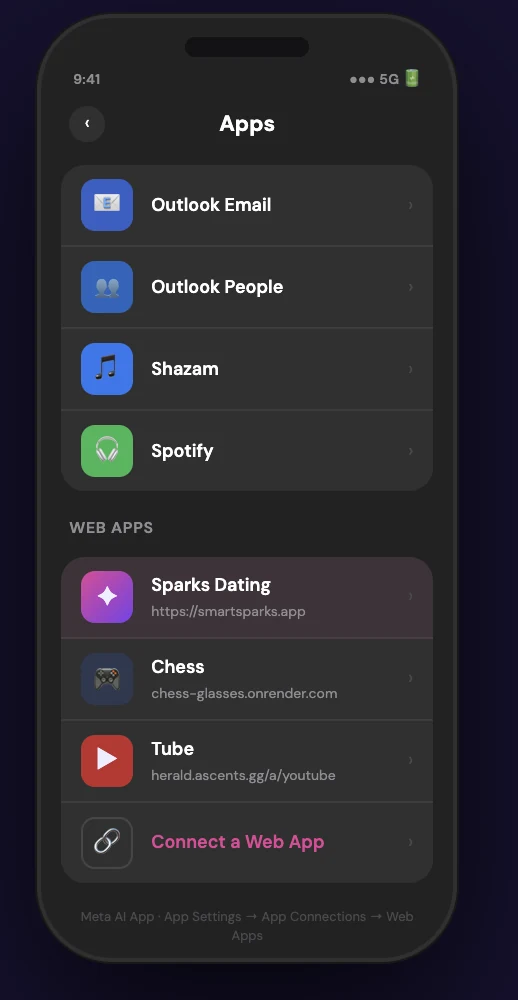
1. Add Spark to your glasses
- Open the Meta AI app on your phone (the app your glasses already use).
- Turn on Developer Mode so Web Apps are available.
- Add a Web App with the address smartsparks.app.
2. Get your Glasses Code (on your phone)
- When Spark asks, Create PIN: pick a 6-digit PIN and enter it twice.
- Spark shows a 6-digit Glasses Code. Keep it on screen.
3. Sign in on your glasses
- Launch Spark from your glasses and choose 👓 Glasses.
- Tap in the Glasses Code from your phone, then your PIN. No typing, no password.
Next time you open Spark on those same glasses, you only need your PIN. (A Glasses Code needs an email-and-password account.)
Using the glasses
- Swipe up, down, left or right to move the highlight around the screen.
- Pinch to select whatever is highlighted — a profile, a button, a chat.
- The bottom bar takes you between Discover, Matches, Messages, Explore and Profile.
- To fill in a text field, highlight it and pinch to open the glasses editor, or use the ⌨️ keyboard (dictate, handwrite or pick predicted words).
- Prefer talking? See Voice commands.
Discover
Discover shows one profile at a time from people near you who match your preferences.
| To… | Do this |
|---|---|
| Like someone | Tap ♥ (or say "like"). Free members get 8 likes a day. |
| Pass | Tap ✕ (or say "pass"). |
| Super Like | Tap ⭐ to stand out. 1 a day free, unlimited with Premium. |
| See more | Tap the card to open the full profile: all photos, bio, prompts and details. |
| Undo a pass | Rewind ↩️ Premium |
| Change who you see | Use the filter icon to set age range and distance. Recently active and verified-only filters are Premium |
Chips across the top: All 🌎 — everyone who fits your filters · Nearby 📍 — people within your distance (use − and + to change the miles) · Online 🟢 — people active in the last few minutes · Sparks ✨ — people who liked you and you haven't matched yet.
When you both like each other, it's a match and you can start chatting.
Not showing up for others? Your profile needs a photo — and check you haven't turned on Hide my profile (see Menu & settings).
↑ Back to topMatches
- The Matches tab lists everyone you've matched with. Tap someone to open their profile or start a chat.
- Liked you shows people who already liked you. Free members see them blurred; with Premium you see who they are and can like them back instantly.
- When you match, Spark shows an "It's a Spark!" screen — tap to say hello, or keep browsing.
- Tap a match to open their full profile, photos and intro video — message them from there, or use ⋯ More to delete the conversation, unmatch, set up a date check-in, or report and block.
Messages
- Open Messages and tap a conversation. Type on the keyboard, tap Dictate 🎤 to speak your message, use Write ✍️ to handwrite, or add an emoji 😊. While the box is empty you get quick replies such as "Sounds good 👌"; while typing you get suggested words.
- Starting a chat: tap the 🚩 button to challenge your match to a Flag Duel — 5 quick dating scenarios, answered 🚩 Red Flag or ✅ Green Flag, blind until you've both played. The result card shows how in sync you are, and 💬 Discuss on the scenarios you split on starts the conversation. Your first 3 duels with each match are free — Premium members duel without limits.
- Voice notes: press and hold the mic to record, listen back in the preview, then tap Send — or 🗑 Discard to throw it away.
- 🌐 Auto-translate Premium: tap Auto-translate at the top of a chat and messages and voice notes in another language show a translation underneath. Choose your language (22 to pick from) in Profile → Edit Profile → 🌐 Translation Language.
- Read receipts Premium: "Seen" appears under messages they've read.
- ✨ Spark Team: messages from the Spark team arrive as their own conversation — you can reply right in the chat, and delete it from the ⋯ menu.
- The ⋯ menu in a chat lets you start a Date check-in, unmatch, delete the conversation, or report / block. Deleting clears the chat on your side only; unmatching removes it for both of you.
Explore
| Tab | What it's for |
|---|---|
| 🧭 Nearby | See who's around you right now, as a grid or a list (☰ switches the view). |
| 🔥 Fire or Ice | A quick game: rate profiles 🔥 or 🧊 and see how the community votes. |
| ⚡ Spark Score | Your Fire rating from how others rate you, with your hot streak and weekly chart. Premium |
| 💬 Chat Rooms | The way into the Lava Lounge. |
Lava Lounge & trivia Premium
Themed chat rooms where you can get to know people before you match. Open them from Explore → 💬 Chat Rooms — you're signed in automatically with your Spark account.
- Tap anyone's photo or name to see their Spark profile and like them, or to mute, block or report them.
- 🎯 Fact or Fake? has its own room: Men vs Women trivia. A coin flip decides which team picks the starting category, then it's 15 statements — fact or fake? — at 30 seconds each. Faster correct answers score more, and every point feeds your lifetime total on the 🏆 Scores board.
- Every room has a quick This or That / Red Flag, Green Flag vote at the top. Game cards have a Hide button that folds them down to a slim strip while you chat.
- Pop-up rooms appear for events like game nights and watch parties, with a live countdown.
- Rooms are cleared every night at midnight, and slow mode keeps spam out.
Trivia nights (US Eastern time)
5 quick questions, 15 seconds each, 100 points per correct answer — ties go to whoever answered fastest.
| Day | Room | Time |
|---|---|---|
| Monday | 🎵 Music & Moods | 9 PM |
| Tuesday | 🍜 Foodies Only | 9 PM |
| Wednesday | 💼 Ambitious Minds | 9 PM |
| Thursday | 🕶️ Man Cave (men) · 🌷 Safe Place (women) | 9 PM |
| Friday | 🌙 Friday Night Vibes | 9 PM |
| Saturday | ✈️ Wanderlust | 9 PM |
| Sunday | 🏀 Sports Talk | 7 PM |
Lounge badge: wins raise your level — Starter (3 wins), Pro (5), All-Star (10), MVP (25), Hall of Fame (50) — and the week's champion gets a special badge. Your badge shows on your Spark profile; hide it any time in ☰ Menu → 🎮 Show my Lounge badge.
↑ Back to topYour profile
- Edit Profile to change photos, bio (speak it with 🎤 if you like), prompts, interests and details. Free profiles hold 3 photos; Premium holds 6.
- Intro video: record or upload one clip of up to 20 seconds. It's checked before it shows, and you can replace or remove it any time.
- Get Verified: take a quick selfie copying the pose shown. The Spark team checks it against your photos, and you get a blue ✓ that others can see. (Use your phone — the glasses have no front camera.)
- Who viewed you: see how many people viewed your profile; Premium shows who and when.
- Boost Premium: puts you at the top of Discover for 30 minutes, once a day.
- 👓 Reset Glasses Code lives here too (see Glasses setup).
Safety
Every safety feature is free for every member.
Date check-in
- In the chat with your date, open ⋯ → 🛡️ Date check-in.
- Add where you're meeting, when it starts, and when Spark should check on you (1–4 hours later).
- Tap ✅ Start check-in, and 📤 Share with a friend if you like — they don't need Spark.
- At check-in time Spark asks if you're OK. Tap I'm safe, or I need help to share your live location with a friend; a Call 911 button is right there.
Only you can see your check-in — your date is never told. Turn on notifications so Spark can reach you.
Heading Home
A timer for getting home safely — start it when you set off, and Spark checks in until you're home.
- Open ☰ Menu → 🛡️ Safety Center and start a timer: 15, 30, 45 or 60 minutes.
- Pick your safety contact: one of your matches (they get alerts inside Spark), or anyone else — Spark gives you a private link to send them.
- A countdown bar sits above the bottom menu. Tap I'm home when you arrive, or +15 if you need more time.
- If the timer runs out, Spark waits 2 more minutes, then tells your contact you haven't checked in and shows them your last known location. When you tap I'm home, they see that you're home safe.
Spark saves your location when you start and updates it while Spark is open. Your contact only sees it if the timer runs out.
Report or block
From a chat's ⋯ menu, a profile, or a Lounge member's name, choose Report / Block and pick a reason (fake profile, inappropriate photos, harassment, spam, underage or other). Blocking hides you from each other instantly; reports go to the Spark team. Unblock people in ☰ Menu → 🚫 Blocked people.
Voice commands (glasses)
Voice commands run in Spark on your phone (Chrome or Safari) while your glasses are connected by Bluetooth, so replies play through your glasses speakers. Turn it on in ☰ Menu → 🎛️ Input Modes → Voice. Voice isn't available inside the Ray-Ban Display glasses browser itself — there, use the touchpad. Say "Hey Spark", then your command within a few seconds; say "help" any time to see the full list.
| Say | What happens |
|---|---|
| "like" · "pass" · "super like" | Acts on the profile you have open (or the highlighted one), then tells you who's next |
| "next profile" | Move to the next profile without passing |
| "read bio" | Hear their bio read aloud |
| "interests" · "how old" · "where are they" | Hear what they're into, their age, or their location |
| "open profile" | Open the full profile |
| "discover" · "matches" · "messages" · "explore" · "my profile" | Jump to that screen — "open" or "go to" works first too, e.g. "open explore" |
| "read messages" | Hear your latest unread messages |
| "talk to Sarah" | Open a chat by name ("open Sarah" and "chat with Sarah" work too) |
| "send …" | Send a message in the open chat, e.g. "send hey, how's your day?" |
| "status" | Hear your match count and unread messages |
| "I'm home" · "add time" · "heading home" | Control the Heading Home timer |
| "stop" · "close help" | Stop speaking · close the help screen |
Spark only speaks when it needs to: it answers your commands, plays a chime and says "It's a match with Maya!" for a new match, and "New message from Maya" for messages (at most once a minute per person). In voice mode, tapping the 🎙️ mic button works like saying "Hey Spark".
↑ Back to topHelp & FAQ
My glasses say "Code not found" or "Access denied".
Get a fresh code: on your phone, Profile → 👓 Reset Glasses Code. Make sure your glasses are on Wi-Fi.
I forgot my PIN.
Choose Use full login instead on the PIN screen, sign in with your email and password, then set a new PIN.
I paid but Premium isn't on yet.
It usually switches on within a minute. If it hasn't, close and reopen Spark, then contact us.
Nobody can see my profile.
Add a photo — profiles without one are hidden — and check Hide my profile in ☰ Menu → Privacy.
I get no notifications on my iPhone.
Open Spark from your Home Screen icon (not Safari) and turn notifications on there. If you see "Notifications are blocked", allow notifications for Spark in your phone's Settings.
How do I delete my account?
Go to Profile → 🗑️ Delete Account and tap Schedule Deletion. Your profile hides right away; you have 7 days to change your mind with Cancel Deletion. After 7 days, Spark permanently deletes your profile, photos, matches, messages and likes.
Something isn't working.
Use ☰ Menu → 💬 Send feedback — it reaches the Spark team directly — or email support@smartsparks.app.
↑ Back to top